
ST777 Game APK Download Pakistan – Latest Version & Installation Guide
ST777 Game is currently available as an APK for Android devices rather than through the Google Play Store. Users must download and install the app manually on a compatible Android phone.
Because APK files can be modified or repackaged by third parties, the source matters. Use the verified ST777 download link provided on this page and check the APK details before installing it.
ST777 Game System Requirements
ST777 Game is available for Android as an APK, which means it needs to be downloaded and installed manually rather than through the Google Play Store. This guide explains how to download and install the APK, check your device requirements, troubleshoot common installation problems, and stay safe when installing an app from outside the Play Store.
| System Requirement | Recommended |
| Operating System | Android 5.0 or higher |
| RAM | 2 GB or more |
| Free Storage | Native App: 58.18 M Speed App: 7.04M |
| Internet | Stable mobile data or Wi-Fi |
| Mobile Number | You active Pakistani Mobile Number |
Before Downloading ST777 APK
Before downloading the APK, make sure your Android phone has enough free storage, a stable internet connection, and a compatible Android version. Download the file from the verified source provided on this page and avoid APKs shared through unknown websites, messaging groups, or unofficial download pages.
If Android displays a security warning during installation, read the warning carefully before continuing. Never install a file that your device identifies as malicious or suspicious.
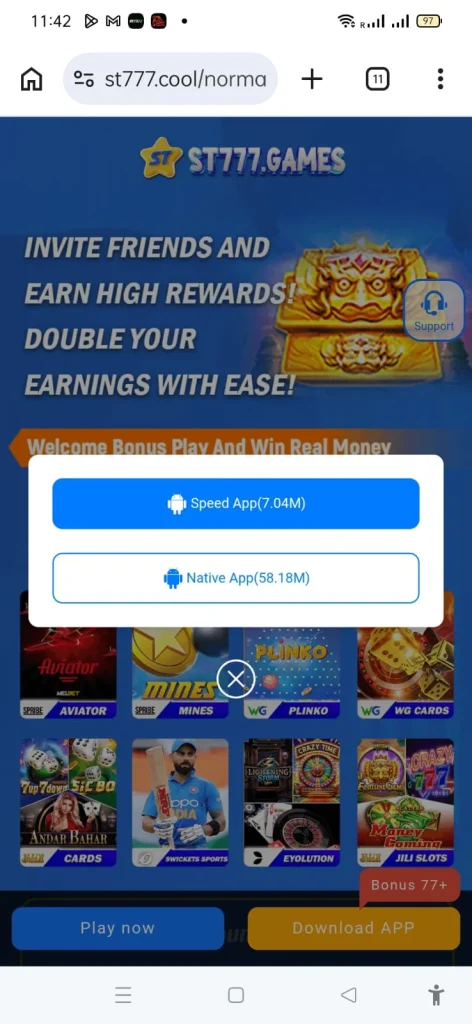
How to Download ST777 Game APK (Step-by-Step)
To download the APK, follow these steps:
- Open your mobile browser.
- Visit the ST777 website.
- Open the Download APK page.
- Tap Download ST777 Game APK.
- Wait for the download to finish.
- Open your Downloads folder.
How to Install ST777 Game APK on Android
Once the APK has finished downloading, you can install it directly from your Android phone.
- Locate the downloaded ST777 APK.
- Tap the APK file.
- If Android asks for permission, allow your browser or file manager to install unknown apps.
- Tap Install.
- Wait for the installation to be completed.
- Tap Open.
Important Safety Tips Before Downloading
Before installing an APK, a few simple precautions can reduce the risk of installing a modified or unsafe file.
- Use a trusted download source. Download the ST777 APK from the verified link provided on this website rather than random APK-sharing sites.
- Be careful with shared APK files. Avoid installing APKs received from unknown people, messaging groups, or unverified websites.
- Turn off APK installation permission afterward. Once ST777 has been installed, you can return to your Android settings and disable the Install unknown apps permission for your browser or file manager.
Before opening the file, check that the filename, file size, and source match the information provided on the download page. Avoid installing an APK if the details appear unexpectedly different.
After installation, return to your Android security settings and disable the “Install unknown apps” permission for the browser or file manager you used.
Common Mistakes to Avoid
| Mistake | Why It Causes Problems | Solution |
| Downloading the APK from a random link | The file could be fake, modified, or contain malware. | Download the APK only from a trusted and verified source. |
| Not allowing installation from unknown sources | Android may block the APK from being installed. | Temporarily allow your browser or Files app to install unknown apps, then disable the permission after installation. |
| Not having enough storage space | The download or installation may stop before it is completed. | Free up some storage before starting the installation. |
| Using an outdated Android version | Older software may not support the current version of the app properly. | Check for available Android updates and install them if your device supports them. |
| Downloading over an unstable connection | A weak connection can result in an incomplete or corrupted APK file. | Use a stable Wi-Fi connection or reliable mobile data when downloading. |
| Opening an incomplete APK download | Android may show an installation error if the file was not downloaded completely. | Delete the incomplete file and download the APK again from a trusted source. |
| Installing an old APK version | Older releases may have compatibility or login issues | Download the current version from the verified source |
| Installing over a problematic old version | Previous files or settings may interfere with installation | If necessary, remove the old version and install a fresh copy |
Troubleshooting Common Download & Installation Issues
Even when the installation process is straightforward, you may occasionally run into a problem. The following checks can help resolve some of the more common issues.
The download does not start
First, check your internet connection and try refreshing the download page. If the problem continues, clear your browser cache or try downloading the APK using another browser. It is also worth checking that your phone has enough free storage.
The APK file appears to be corrupted
A corrupted or incomplete download can prevent Android from installing the app correctly. Delete the existing APK file and download it again from a trusted source. Avoid using a file that was shared through an unknown website or messaging channel.
The app installs but will not open
Check whether your phone is running a compatible Android version and make sure there is enough storage available. A simple restart can also resolve temporary problems. If ST777 still does not open, uninstall the current installation and try installing a fresh copy of the latest APK.
Android shows a permission or security warning
Android can display warnings when an app is installed from outside the Google Play Store. This does not automatically mean the file is unsafe, but you should verify the source before continuing. If the warning mentions malware, suspicious behavior, or an untrusted file, do not ignore it simply to complete the installation.
If you have verified the APK source and still cannot complete the installation, check the ST777 Customer Support or Security Center pages for additional guidance.
App not installed” error
If Android displays an “App not installed” message, check that you have enough storage and that the APK is compatible with your device. A previous installation or an incomplete APK download can also cause the problem. Remove the incomplete file, download a fresh copy, and try again.
Not enough storage” error
Free additional storage and try the installation again. Remember that Android may require more temporary space during installation than the size of the downloaded APK itself.
Frequently Asked Questions
Is the ST777 Game APK free to download?
Yes. Downloading the APK itself does not normally require payment. However, if you choose to play using a real-money balance, you will need to make a deposit through one of the payment methods available in the app.
Is ST777 Game available on the Google Play Store?
ST777 is distributed as an Android APK rather than through the Google Play Store. This means Android users need to download the APK and install it manually on their device. Do not download an APK claiming to be an official Google Play version from an unrelated third-party website.
Is it safe to install the ST777 Game APK?
The safety of an APK depends on its source and the integrity of the file.
Download ST777 only from a source you trust, avoid modified or repackaged versions, and pay attention to Android security warnings. Before installation, check the file details and permissions where available. If Android identifies the APK as malicious or suspicious, do not proceed with the installation.
What Android version do I need?
The required Android version can vary between app releases. Android 5.0 or later may be supported by some versions, but you should check the requirements for the particular APK you are downloading. Keeping your phone updated is also recommended for better compatibility and security.
Can I install ST777 Game on an iPhone?
The APK format is designed for Android devices and cannot be installed directly on an iPhone. If ST777 offers an iOS version or another way to access the service, availability would depend on the platform’s current offerings.
Can You Install ST777 Game on PC?
The ST777 APK is designed for Android devices. If you want to use an Android APK on a Windows computer, you may need a compatible Android emulator. Emulator compatibility can vary, so check that the emulator and ST777 APK support the required Android version before attempting installation.
The download is very slow. What should I do?
Start by checking your internet connection. If possible, switch to a more stable Wi-Fi network or try again when the connection is less congested. You can also refresh the download page or clear your browser cache if the problem continues.
Do I need to enable unknown sources every time?
Not necessarily. Android normally requires permission for the specific browser or file manager being used to install an APK. Once the installation is complete, you can disable Install unknown apps again for that application as an additional security precaution.
What should I do after installing the app?
After installation, open the app and follow the on-screen instructions. New users can register using the available registration method, while existing users can log in with their account details. Before making any deposit, review the available payment methods, bonus conditions, withdrawal requirements, and account-security settings.